
The demand for online education has grown rapidly, making high-quality video production an essential part of teaching, coaching, corporate training, and professional webinars. Whether you’re creating online courses, hosting live webinars, delivering virtual workshops, or recording educational content, professional studio lighting can significantly improve your presentation and viewer engagement.
Good lighting helps instructors appear confident, approachable, and professional while ensuring clear video quality across different devices and streaming platforms. Even the best camera cannot produce excellent results without proper lighting.
In this guide, we’ll explain how to choose the best studio lighting for online courses and webinars, the equipment you’ll need, and the best practices for creating a professional learning environment.
Why Lighting Matters for Online Education
Lighting directly affects how students and viewers perceive your content.
Poor lighting can result in:
- Dark facial features
- Harsh shadows
- Uneven exposure
- Poor color accuracy
- Eye strain for viewers
- Reduced video quality
Professional lighting creates a polished appearance that helps learners stay focused on your content.
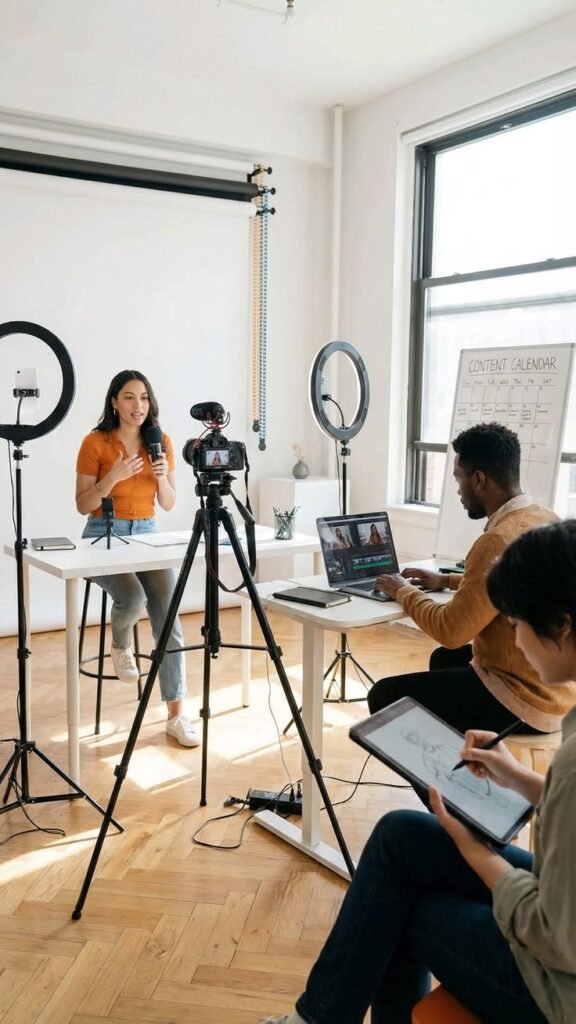
Essential Lighting Equipment
A professional online teaching studio typically includes:
- LED flat panel lights
- Soft LED panel lights
- LED Fresnel lights
- Softboxes
- Light stands
- Diffusion panels
- Reflectors
- Background lights
LED lighting is ideal because it provides continuous illumination, low heat output, and energy-efficient performance.
Use a Three-Point Lighting Setup
The most effective lighting setup for online courses and webinars is the classic three-point lighting technique.
Key Light
The key light is your primary light source and should be positioned approximately 45 degrees from the camera.
It provides the main illumination for your face.
Fill Light
A fill light softens the shadows created by the key light while maintaining natural facial depth.
It should be less bright than the key light.
Back Light (Hair Light)
The back light separates you from the background, creating a more professional and three-dimensional appearance.
This setup works well for both live webinars and pre-recorded lessons.
Best LED Lights for Online Courses
LED Flat Panel Lights
LED flat panels provide soft, even illumination that flatters presenters and reduces harsh shadows.
They are perfect for:
- Online courses
- Zoom meetings
- Microsoft Teams presentations
- Webinars
- Virtual classrooms
Soft LED Panel Lights
Soft LED panels create natural-looking light, making them ideal for instructors who spend long hours on camera.
RGBAL Studio Lights
RGBAL fixtures provide exceptional white light quality, accurate skin tones, and adjustable color temperature.
They are an excellent choice for professional educators, training studios, and content creators.
LED Tube Lights
Tube lights are useful as background or accent lighting to add depth and visual interest to your studio.
Choose High-Quality Lighting
Professional studio lights should offer:
- High CRI (95+)
- High TLCI ratings
- Flicker-free performance
- Adjustable brightness
- Adjustable color temperature
- Silent or fanless operation
These features ensure your videos remain clear and professional on every camera.
Match Color Temperature
For natural-looking results, use consistent color temperatures throughout your setup.
Common settings include:
- 5600K for daylight-balanced lighting
- 3200K for warmer indoor environments
Avoid mixing different color temperatures, as this can create unnatural skin tones and inconsistent colors.
Improve Your Background Lighting
Background lighting adds depth and makes your videos look more polished.
Options include:
- LED tube lights
- RGB accent lights
- Soft background wash lights
- Practical lighting such as desk lamps
Subtle background lighting creates a more engaging learning environment without distracting viewers.
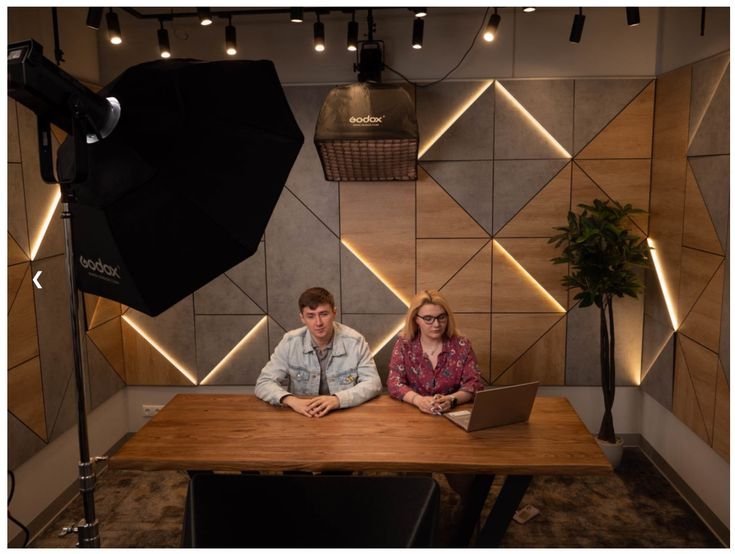
Camera Position and Lighting
To achieve the best results:
- Position the camera at eye level.
- Place the key light slightly above eye level.
- Avoid strong overhead room lights.
- Keep enough distance between yourself and the background.
- Ensure lighting is evenly distributed across your face.
Proper camera placement works together with lighting to create a professional presentation.
Common Lighting Mistakes
Avoid these common errors:
- Using only ceiling lights
- Positioning lights directly in front of the camera
- Mixing different color temperatures
- Creating harsh facial shadows
- Overexposing the background
- Ignoring background lighting
- Using low-quality lighting fixtures
Correcting these issues dramatically improves video quality.
Best Applications
Professional studio lighting is suitable for:
- Online courses
- Live webinars
- Corporate training
- Virtual classrooms
- Coaching sessions
- Educational YouTube channels
- Online workshops
- Product demonstrations
- Business presentations
High-quality lighting helps maintain viewer attention and increases the perceived professionalism of your content.
Frequently Asked Questions
What lighting is best for online courses?
LED flat panel lights and soft LED panels are among the best choices because they provide soft, even illumination that flatters presenters and reduces harsh shadows.
Do I need three-point lighting for webinars?
Yes. A three-point lighting setup creates balanced, professional-looking video by combining a key light, fill light, and back light.
What color temperature should I use?
Most creators use 5600K daylight-balanced lighting, although 3200K can be appropriate for warm indoor environments if all lights are matched.
Why is CRI important?
A high CRI ensures natural skin tones and accurate colors, improving the overall quality of your video.
Can RGB lights be used for online teaching?
Yes. RGB or RGBAL lights are excellent for adding subtle background colors and creating a modern, engaging studio environment while white light is used for illuminating the presenter.
Conclusion
Professional studio lighting is one of the best investments you can make for online courses and webinars. By combining high-quality LED lighting, a balanced three-point lighting setup, accurate color temperature, and thoughtful background illumination, you can create educational videos that look polished, engaging, and professional.
Whether you’re teaching online classes, hosting webinars, recording tutorials, or delivering corporate training, the right lighting setup enhances video quality, builds credibility, and provides a better learning experience for your audience.